


When it comes to managing large media libraries in WordPress, organization and SEO optimization are everything. That’s where Real Physical Media comes in. This advanced plugin doesn’t just help you organize media files visually – it physically restructures your WordPress media folder structure on the file system itself.
For content creators, developers, and SEOs who care about clean file management and better search engine visibility, Real Physical Media is a game-changing plugin.
📦 What Is Real Physical Media for WordPress?
Real Physical Media is a powerful WordPress plugin that allows you to organize your media files into physical folders on your server. Unlike virtual folder systems that just offer a UI representation, this plugin physically moves your files to match your folder structure.
This means:
- Better FTP organization
- SEO-friendly file paths
- Faster indexing in search engines like Google Images
- Improved performance and easier backup management
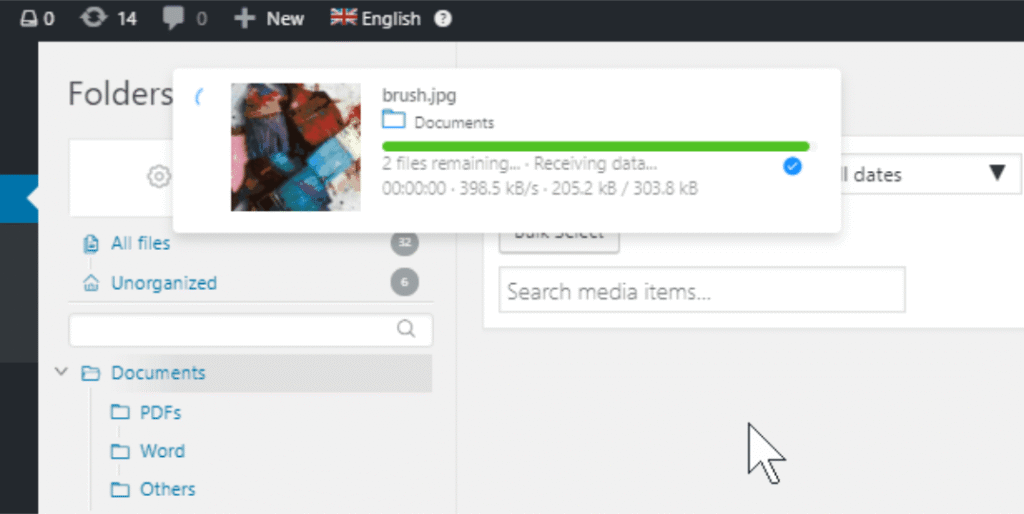
🔥 Key Features of Real Physical Media Plugin
📁 Physical Folder Structure
Real Physical Media modifies the actual paths of your media files on your server. It creates a real folder structure that matches how you’ve arranged files in your WordPress media library.
⚙️ SEO-Friendly Descriptive Paths
SEO is all about relevance and clarity. By renaming and restructuring files into descriptive folders, Real Physical Media enhances your media file visibility in search engines – especially image search.
🕹️ Background Queue System
The plugin uses a high-performance queue system that processes file movements in the background. You can even configure a CRON job for complete automation, ensuring smooth performance.
🔁 Redirects & SEO Safety
Moving files physically could normally break URLs, but Real Physical Media smartly adds 301 SEO redirects. This protects your rankings, backlinks, and internal links automatically.
🔗 Real Integration with Real Media Library
Already using Real Media Library? Real Physical Media fully supports it! You can now physically reorganize folders you’ve already created in Real Media Library without losing any structure.
✏️ Clean File Naming
It automatically removes special characters, applies a custom suffix, and supports extra-long URLs for maximum file clarity and SEO control.
🌐 Multisite Support
Works flawlessly in WordPress Multisite environments, giving you file control across multiple sites from a single dashboard.
🔄 Import Support
Easily import categories/folders from third-party plugins to Real Physical Media, making migration or upgrade hassle-free.
🔍 Better FTP Experience
With descriptive, organized physical folders, browsing your media library via FTP becomes seamless and intuitive.
🌟 Benefits of Using Real Physical Media
- ✅ Organizes your media files both visually and physically
- ✅ Boosts SEO with clean, keyword-rich folder structures
- ✅ Improves site speed by making file access faster
- ✅ Helps with compliance (GDPR/DSGVO ready)
- ✅ Enables advanced developer access via FTP or third-party tools
- ✅ 100% compatible with Real Media Library
💡 Who Should Use This Plugin?
- WordPress users with a large volume of media files
- SEO agencies and content marketers
- Bloggers and news sites that rely on image traffic
- Developers building media-heavy websites
- Website owners who prefer clean FTP folder management
🚀 How to Use Real Physical Media
- Install the plugin through the WordPress admin or upload it via FTP.
- Configure default path rules and suffix preferences.
- Use Real Media Library (optional) to organize files visually.
- Start the queue to move files into physical folders.
- (Optional) Set up CRON job for auto-background file restructuring.
📥 Download & Demo
🔗 Live Demo: Explore Real Physical Media Plugin
📦 Free Download: Download Real Physical Media WP Plugin
🧰 Troubleshooting Notes
- Turn off AdBlocker or use a different browser if download doesn’t start.
- Ensure you have proper file permissions for media folders.
- Make sure to back up your site before mass restructuring.
🏁 Final Thoughts
With Real Physical Media, you get more than just a media organizer – you gain full control over your server’s file system, boost SEO through structured file paths, and improve overall media file management. If you’re serious about image SEO and clean media handling, this plugin is a must-have for every WordPress professional.
🔗 Related Premium Theme for WordPress:-
👉 Elessi 6.4.3 – WooCommerce AJAX WordPress Theme – RTL support
👉 Explore – Soledad 8.6.7 – The Ultimate Multipurpose Blog, Newspaper & WooCommerce WordPress Theme
